Lian Li O11DM-1X VERTICAL GPU BRACKET KIT
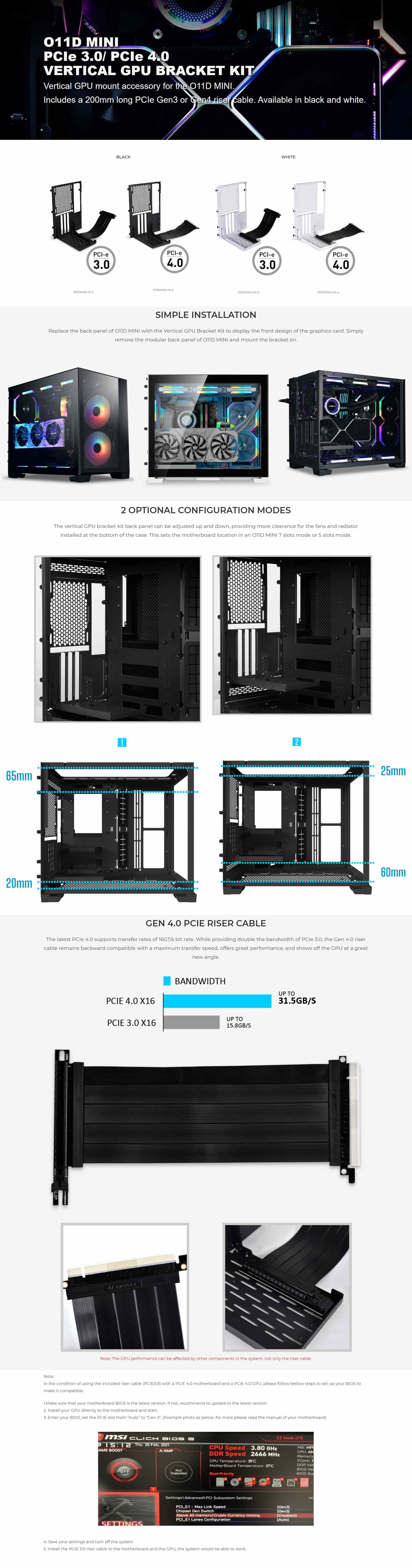
Vertical GPU mount accessory for the black and white O11D MINI which includes a 200mm long PCIe Gen3 x16 riser cable. Allows showing graphic card with simple installation and different configurations.
SIMPLE INSTALLATION
Replace the back panel of O11D MINI with the Vertical GPU Bracket Kit to display the front design of the graphics card. Simply remove the modular back panel of O11D MINI and mount the bracket on.
OPTIONAL CONFIGURATION MODES
The vertical GPU bracket kit back panel can be adjusted up and down, providing more clearance for the fans and radiator installed at the bottom of the case. This sets the motherboard location in an O11D MINI 7 slots mode or 5 slots mode.
Important Instructions:
In the condition of using the included riser cable (PCIE3.0) with a PCIE 4.0 motherboard and a PCIE 4.0 GPU, please follow bellow steps to set up your BIOS to make it compatible.1.Make sure that your motherboard BIOS is the latest version. If not, recommend to update to the latest version.
2. Install your GPU directly to the motherboard and start.
3. Enter your BIOS, set the PCIE slot from “Auto” to “Gen 3”.
4. Save your settings and turn off the system
5. Install the PCIE 3.0 riser cable to the motherboard and the GPU, the system would be able to work.