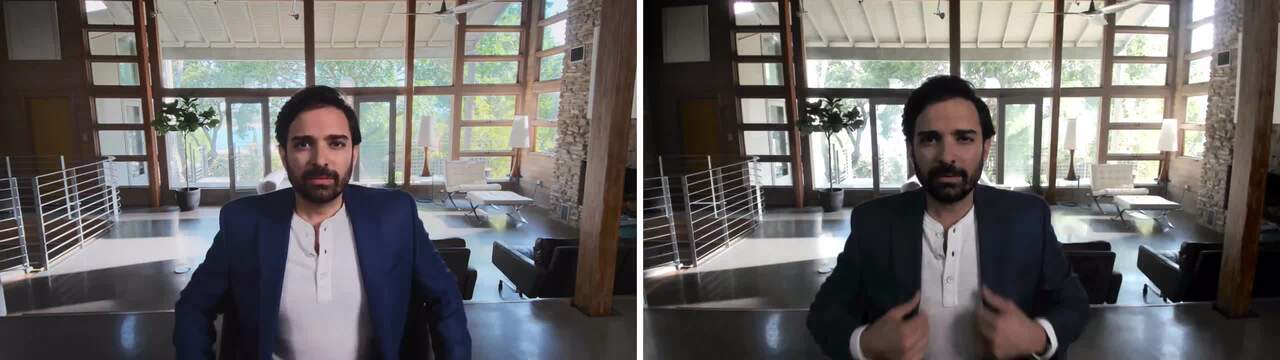
Digital Overlap HDR delivers true-to-life color in extreme lighting environments, while 3D/2D video noise reduction automatically eliminates motion blur and grainy images, even in low light–so you always look great.
Keeping you in focus
Advanced AI auto framing works to always stay focused on what matters most—you. It keeps you at the center of the picture no matter where you move. You can also control the sensitivity and how quickly the camera tracks you, and how tight the framing is.
Engineered to be effortless
Designed for your virtually borderless displays, your webcam magnetically attaches to the mount and sits well on your monitor without blocking a single pixel.
Dell Display and Peripheral Manager
Experience Dell’s singular, innovative application to optimise the performance of your entire Dell PC workspace
Engaging interactions
Use HDR for vibrant video, AI Auto Framing to stay centered and in focus, or customise your Fields of View and presets to look great every time. Enable the webcam mic for complete collaboration, where available.
More manageable
Save time and boost IT efficiency with the Dell Device Management Console to manage your Dell peripheral fleet at scale, from a single cloud-based console. Discover expanded Command Line Interface features from Dell Display and Peripheral Manager.
The full picture
Customize how much you want to show of yourself and your surroundings by adjusting your field of view to 65°, 78° or 90°.
Facial recognition
Dell ExpressSign-in detects your presence when you are close and uses Windows Hello to automatically log you in. When you walk away, it locks your system for increased security.
Privacy in a snap
A privacy shutter cap allows you to conveniently snap the cover on the lens and keep it protected when not in use.